Instagram Launches Edits Desktop App for Mac to Challenge CapCut
Instagram has released a desktop version of its Edits video editing application for macOS, introducing multi-track timelines, 4K exports, and advanced color grading. The move directly competes with ByteDance’s CapCut, aiming to accommodate creators whose projects exceed mobile screen limitations. The app integrates AI agents and allows direct publishing to Instagram, signaling Meta’s intensified push into professional-grade creator tools.
Key points
- Instagram, the social media platform owned by Meta, has released a desktop version of its Edits video editing application for macOS.
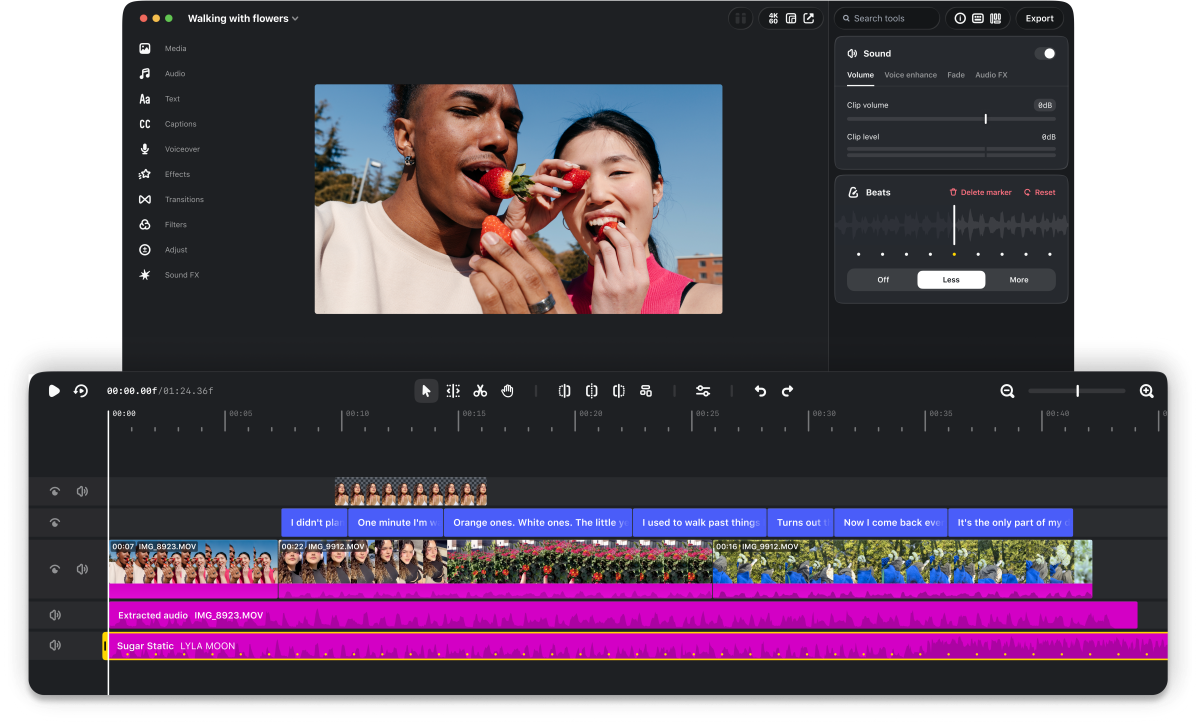
- The new app features multi-track editing, 4K watermark-free exports, advanced color grading, and support for custom keyboard shortcuts.
- The launch positions Edits in direct competition with ByteDance’s CapCut, which has held a dominant position on desktop platforms since 2021.
- The application includes an MCP interface allowing creators to use AI agents, such as Meta’s Muse, for automated rough cuts and editing tasks.
- Creators can publish videos directly to Instagram with native features like tagging and location, while also exporting for use on other platforms.
Instagram Expands Edits to Desktop
Instagram has officially launched a desktop version of its standalone video editing application, Edits, for macOS. This release marks a significant expansion of the tool, which originally debuted on mobile platforms last year. The company stated that the desktop application is designed to handle more complex video-editing projects that benefit from a larger screen, mouse, and keyboard. This move is a strategic response to the growing demands of content creators who find mobile interfaces limiting for professional-grade work.
Competing with CapCut
The introduction of Edits for desktop places Instagram in direct competition with ByteDance’s CapCut. CapCut has been available on desktop for Windows and Mac since 2021 and has established itself as a massively popular tool among creators. By bringing Edits to the desktop, Meta aims to capture a larger share of the video editing market. Brett Westervelt, head of Edits, highlighted the user pain points driving this expansion. He noted that creators often reach a point where a project becomes too large for a phone, with thumbs obscuring the timeline and making precise cuts difficult. The desktop app is intended to support these more ambitious projects.
Advanced Editing Features
The new macOS application offers a suite of professional tools that go beyond basic mobile editing. Key features include a full multi-track timeline, which allows for precise layering of audio and video. Creators can utilize keyframes for transitions and view audio waveforms for accurate cuts. The app also supports advanced color grading tools, providing greater control over the visual aesthetic of videos. Additionally, users can import their own font files and customize keyboard shortcuts, with the option to import shortcuts from other editing software. The app supports multiple aspect ratios, including horizontal and vertical formats, and allows for 4K watermark-free exports.
AI Integration and Agents
A distinguishing feature of the desktop version is its integration with artificial intelligence. Matthew Simari, head of product management for Edits, announced that the app includes a Model Context Protocol (MCP) interface. This allows users to plug in AI agents of their choice to assist with editing. While Meta encourages the use of its own Muse agent, the system is designed to be compatible with any agent that supports the MCP standard. Simari explained that users can ask an agent to access the MCP, make tool calls, and generate a rough cut from a downloads folder. Creators can then open the project file in Edits to continue editing manually, blending agentic automation with precise manual control.
Direct Publishing and Updates
The desktop app maintains seamless integration with the Instagram platform. Users can publish videos directly from Edits to Instagram, retaining native features such as tagging, location data, and trial reels. This functionality ensures that creators can streamline their workflow from editing to posting without leaving the application. Instagram has committed to providing weekly updates to the desktop app, similar to the mobile version. The company is actively soliciting user feedback to shape future improvements and feature developments.
Global Implications for Creators
The launch of Edits for Mac reflects a broader trend among social media platforms to provide comprehensive tools for content creation. By offering professional-grade features on desktop, Instagram is attempting to retain creators who might otherwise migrate to competing platforms with more robust editing capabilities. The integration of AI agents signals a shift toward automated workflows, potentially lowering the barrier to entry for high-quality video production. As the competition between Meta and ByteDance intensifies, creators are likely to benefit from increased functionality and innovation in video editing tools.
Key takeaways
- Instagram has released Edits for macOS, featuring multi-track editing and 4K exports.
- The app directly competes with ByteDance’s CapCut in the desktop video editing market.
- Users can integrate AI agents via MCP for automated editing tasks and rough cuts.
- The application supports advanced color grading, custom fonts, and direct Instagram publishing.
- Weekly updates and user feedback loops are planned to drive future development.
Sources
The WireByte editorial team synthesises technology news from multiple primary sources, verifies the facts, and links every source. Articles are produced with AI assistance and reviewed under our editorial policy.